If you use Timetable (E10), you can access its help articles here
Introduction
In Timetable 2.0, student data (first name, last name, gender, email and groups) is either manually imported, or synced from your school's MIS/SIS.
Groups are used to assign students into class lists. For example: year level, registration/form group, elective/option groups, sports groups, etc. A group is then later used to associate students to a specific class.
This article explains where student data comes from, how to add and manage Custom groups, and what you can (and can’t) edit when groups are imported or manually uploaded from your MIS/SIS.
IN THIS ARTICLE
Students in Timetable 2.0
Students are either synced, or manually uploaded, from your MIS/SIS. As seen below, each student record will display the groups the student is currently allocated to in Timetable 2.0.
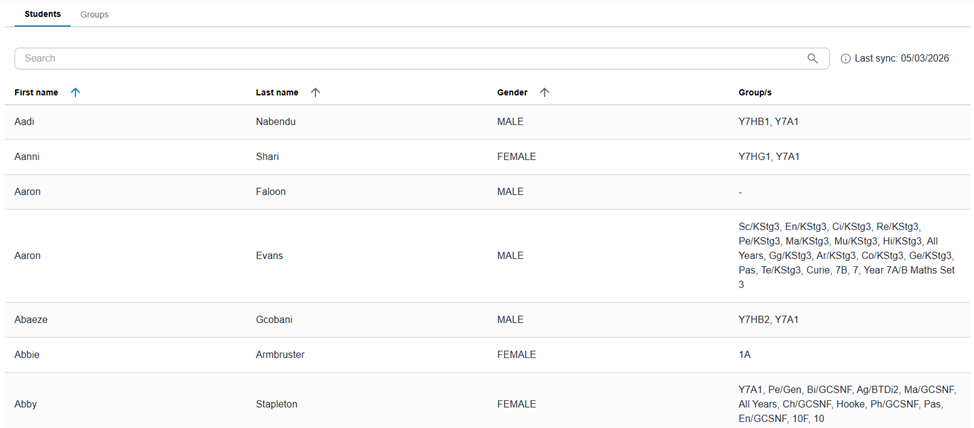
Tip: Use the student record to quickly confirm which groups a student belongs to.
Groups
Timetable 2.0 have three types of groups: Custom groups, Option groups and MIS groups. These groups put students together to form a class list.
Custom groups
Custom groups are created and managed in your Timetable 2.0 system. You can create, edit, and delete them as needed and allocate multiple students to a Custom group.
Option groups
Option groups are created from the Options module.
More information about Options can be found here: Options (electives or choices subjects)
MIS groups
MIS Groups reflect the data from your MIS/SIS through syncing or manual upload. More information
You cannot make any changes to student data that has been synced into Timetable 2.0, as this data is managed through your MIS/SIS. If you have manually uploaded student data, updates can be made by reuploading the data via Admin > Upload Data, ensuring the same Source ID is used as the original upload.
Up next
Was this article helpful?
That’s Great!
Thank you for your feedback
Sorry! We couldn't be helpful
Thank you for your feedback
Feedback sent
We appreciate your effort and will try to fix the article